Under "Additional Actions" in the client report screen, click on the "Share Access" button.
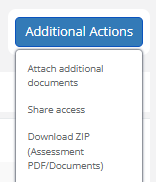
This button allows you to give the Muinmos team access to the data of a specific assessment, for 30 minutes. This is useful in case you need some support in relation to a specific assessment, but of course do not want the data to leave the Platform’s secure environment, and to limit it in time. Our team, of course, will only access the data in order to assist you, and will not save it, transfer it or use it in any way except for support purposes.