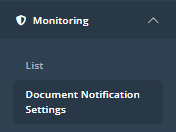
Document monitoring is configured in the "Document Notification Settings" page, found under "Monitoring" in the sidebar:
To create a new Document monitoring setting, click "Create New" in the top right of the screen:

The following pop-up will appear:
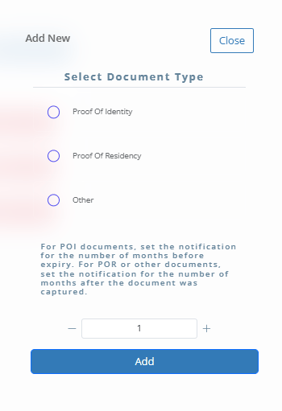
There are two parts to configure; the document type and the interval.
First, the type of document you wish to monitor. The three options are Proof of Identity (Passports, Drivers Licenses, etc.), Proof of Residency (Utility Bills, etc.) and Other. Other can refer to any additional documentation requested during or after the journey that is not either a POI or POR.
Second, determine the notification time frame. For Proof of Identity documents, you will set the number to be the amount of months before the document will expire to receive a notification. That is, if you select 3, then 3 months before the document expires you will receive a notification.
For Proof of Residency and Other documents, you will select the amount of months after document collection to receive a notification.
Once you are ready, click "Add" to save the settings.
Monitoring of documents will then be able to be activated on a per-assessment basis or automatically through use of the "Auto-Monitor on Green RAG" rule as part of a KYC Profile.