The Regulatory Matrix is a way to mirror your organisation’s permissions/regulatory licenses. It reflects the products and services you can offer clients in the different jurisdictions in the world, as per your own licenses and local legislation.
Correct configuration of the Regulatory Matrix in key to the proper operation of the mPASS™ module. For this reason, it is very important that you pay close attention to this process; and revise it upon receiving a new license etc.
To navigate to the page, please see the directions below:
The following screen will appear:
|
Element |
Explanation |
||
|
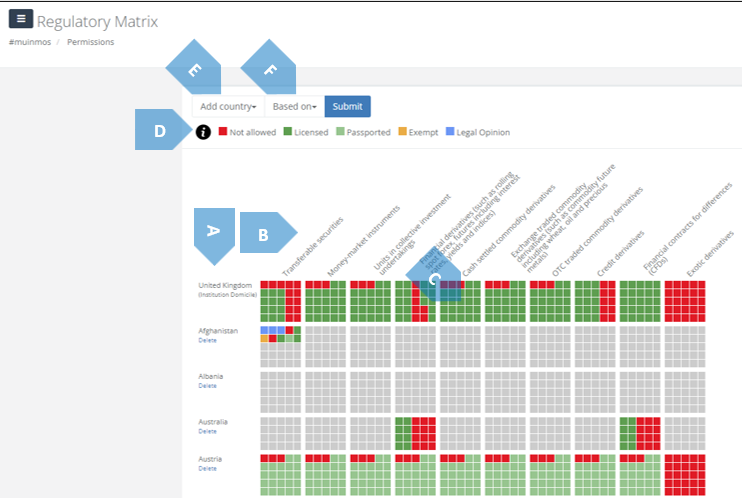
A |
Country |
Denotes the relevant country. |
|
|
B |
Instrument |
Denotes the relevant financial instrument. |
|
|
C |
5x5 Matrix Box |
Denotes the permissions per 5 types of services and 5 types of clients. This, of course, is a graphic representation of them. For a verbal one, press the 5x5 Matrix Box, and a screen similar to the one below will appear: Opens image in full screenOpen
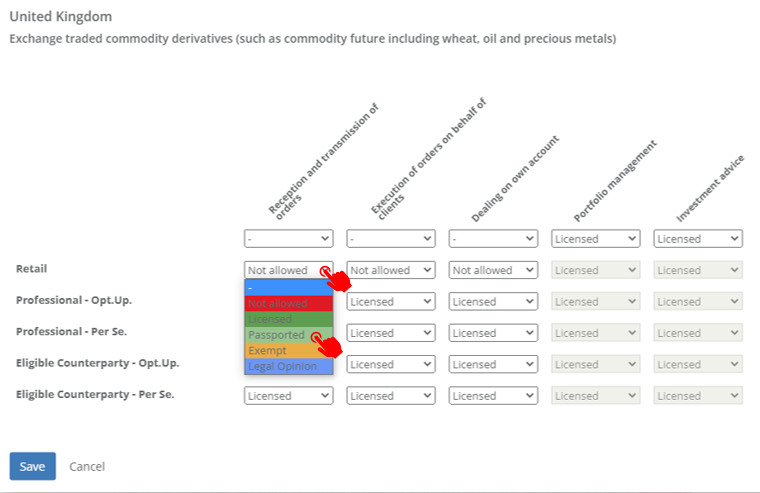
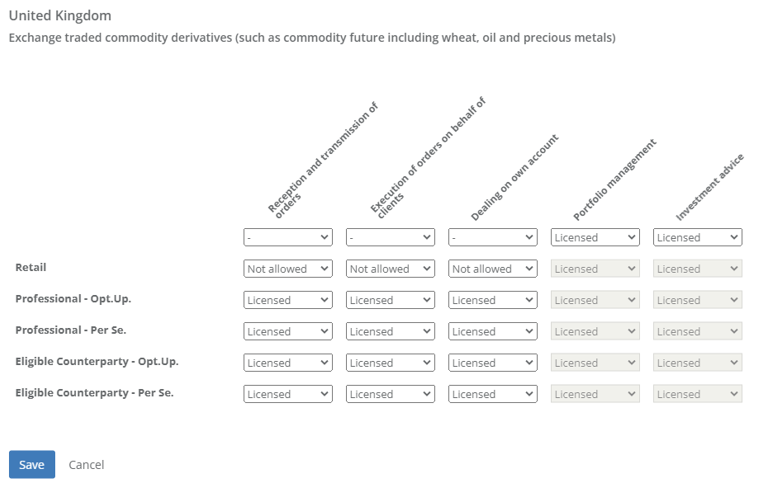 In order to change the permission settings, simply click on any of the fields, and change them into one of the options appearing in the drop-down menu. Opens image in full screenOpen
 |
|
|
D |
Permissions Glossary |
Denotes the different basis of permission to provide a certain service-per-product in every country: |
|
|
|
|
Opens image in full screenOpen

|
Not allowed to provide the certain service-per-product in the country; |
|
|
|
Opens image in full screenOpen

|
Allowed to provide the certain service-per-product in the country by power of license; |
|
|
|
Opens image in full screenOpen

|
Allowed to provide the certain service-per-product in the country by power of passport; |
|
|
|
Opens image in full screenOpen

|
Allowed to provide the certain service-per-product in the country by power of exemption from license; |
|
|
|
Opens image in full screenOpen

|
Allowed to provide the certain service-per-product in the country according to a legal opinion. |
|
E |
Add country |
Here you can add another country to your organisation’s Regualtory Matrix. Simply click, and select a country from the drop-down menu to add. |
|
|
F |
Based on |
This function allows you to instantly “clone” a country you have previously configured in your matrix. Simply select Select a country which was previously configured by you – and the Platform will configure the country from the drop-down list, press “Submit”, and the country you have selected under “Add country” will now appear, having the same Regulatory Matrix as the country selected under “Based on”. |
|